Stop wasting Connects.
Start winning contracts.
Get alerted to the Upwork jobs worth your Connects, filter out clients who never hire, get found by more clients, and see what your Connects actually get you — all in one place.
No card needed to sign up · 14-day free trial · $14.99/month after
Real WinOnUp screens · sample data
Getting work on Upwork shouldn't be this hard.
More Connects. More competition. More time searching and applying. And too often, nothing to show for it.
Connects disappear
You keep spending money on applications without knowing whether any of it is paying off.
Proposals go unseen
You put real time into a proposal, and the client never even opens it.
Jobs go nowhere
You apply to posts that sit open for weeks and never end in anyone getting hired.
Competition piles up
By the time you find a good job, dozens of freelancers have already applied.
Invitations dry up
Clients aren't finding your profile, and you can't tell what needs to change.
Hours get wasted
Searching, filtering, writing and tracking turns into a second job you don't get paid for.
You don't need to apply to more jobs. You need a smarter way to win them.
Two ways to win. One system to master both.
Stop relying on endless proposals. Pursue the right opportunities, become easier for clients to find, and know what's actually working.
Go after the right clients.
Find relevant jobs early, check each client's hiring history, skip the crowded posts, and apply with purpose instead of volume.
Be selective. Be relevant. Be early.
Get found by the right clients.
Line your profile up with the skills clients are actually asking for, so you show up in Upwork search and get invited instead of chasing every job.
Be visible. Be credible. Be chosen.
Know what's actually working.
Proposal views, interviews, contracts, Connects spent, boosting results and profile visibility, from your own Upwork data, so you can sharpen both strategies.
Apply smarter. Get discovered. Win more.
Start your free trialStop guessing what your Connects are getting you.
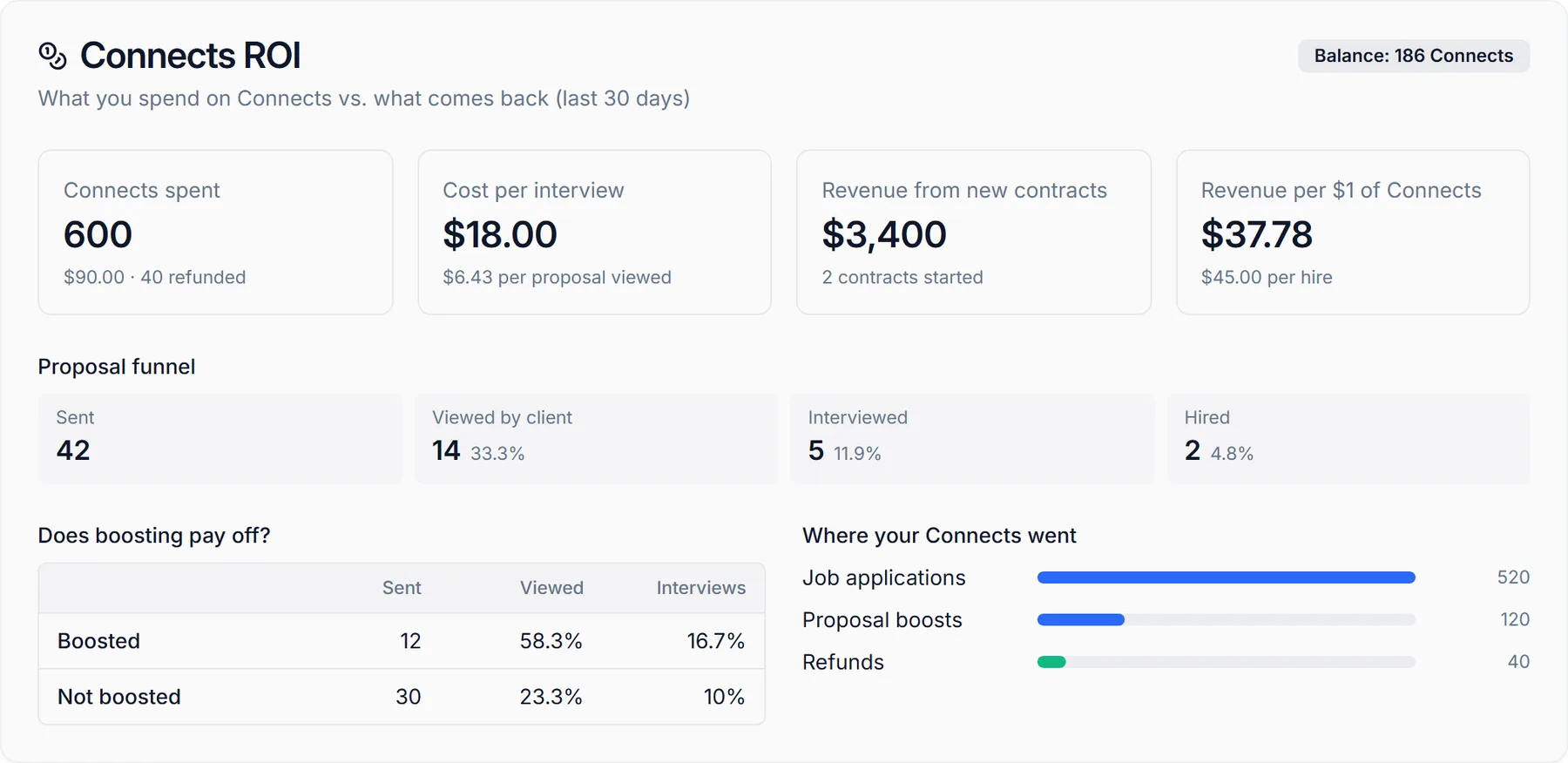
See where your Connects go, how many proposals get viewed, how often they turn into interviews, and whether boosting is worth it. Built from Upwork's own numbers for your account.
- Connects spent, in Connects and dollars, plus refunds and your current balance
- Cost per interview and revenue per $1 of Connects
- Proposal funnel: sent → viewed → interviewed → hired, with rates
- Boosted vs. not boosted: view and interview rates side by side
- Where your Connects went: applications, boosts and refunds
Not every job deserves your Connects.
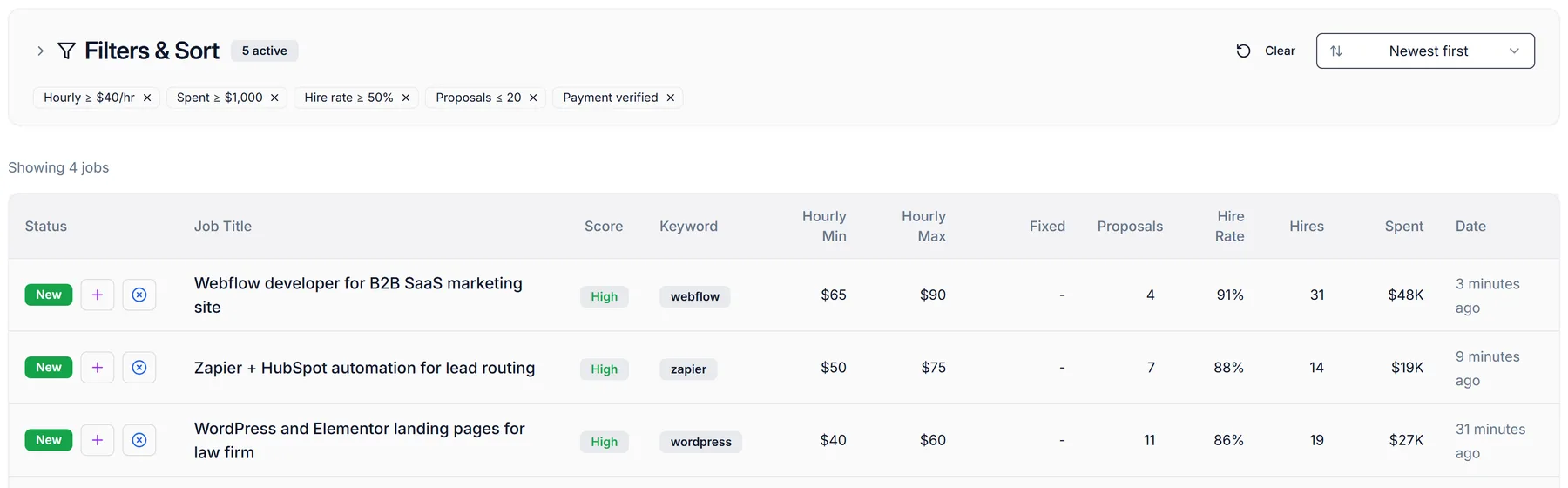
WinOnUp searches Upwork for your keywords around the clock and shows you which clients have a real hiring history, a realistic budget and manageable competition, before you spend a single Connect.
- Searches Upwork every 60 seconds, even when you're offline
- Client score (High / Medium / Low) you can click to see how it was built
- Client hire rate, hires, total spend, rating and payment verification
- How many proposals each job already has
- Budget and hourly rate filters, saved and sortable
The right opportunity. At the right time.
Let WinOnUp watch Upwork while you work. When a new job matches your filters, you hear about it, even with your browser closed.
- Alerts by email, Discord or Google Chat (Google Chat needs Google Workspace)
- Only jobs that match your client, competition and budget filters
- Only fresh jobs, posted in the last hour; several matches arrive as one message
- Usually within a minute or two of a job being posted
- One-click test alert, and a heads-up if your Upwork connection ever drops
Sample alerts
Make every proposal count.
Start from a tailored draft built on the client's job post and your real Upwork experience, then make it yours. Less time starting from scratch, more time showing why you're the right fit.
- Drafts from the full job post plus your synced profile and work history
- Your voice: tone, length, opening style, custom intro and closing
- Chrome extension: generate a draft right on the Upwork job page
- You review and submit on Upwork; WinOnUp never applies for you
For your setup I'd start by mapping your current lifecycle stages so nothing gets routed twice…
Sample draft
Stop chasing every client. Start getting discovered.
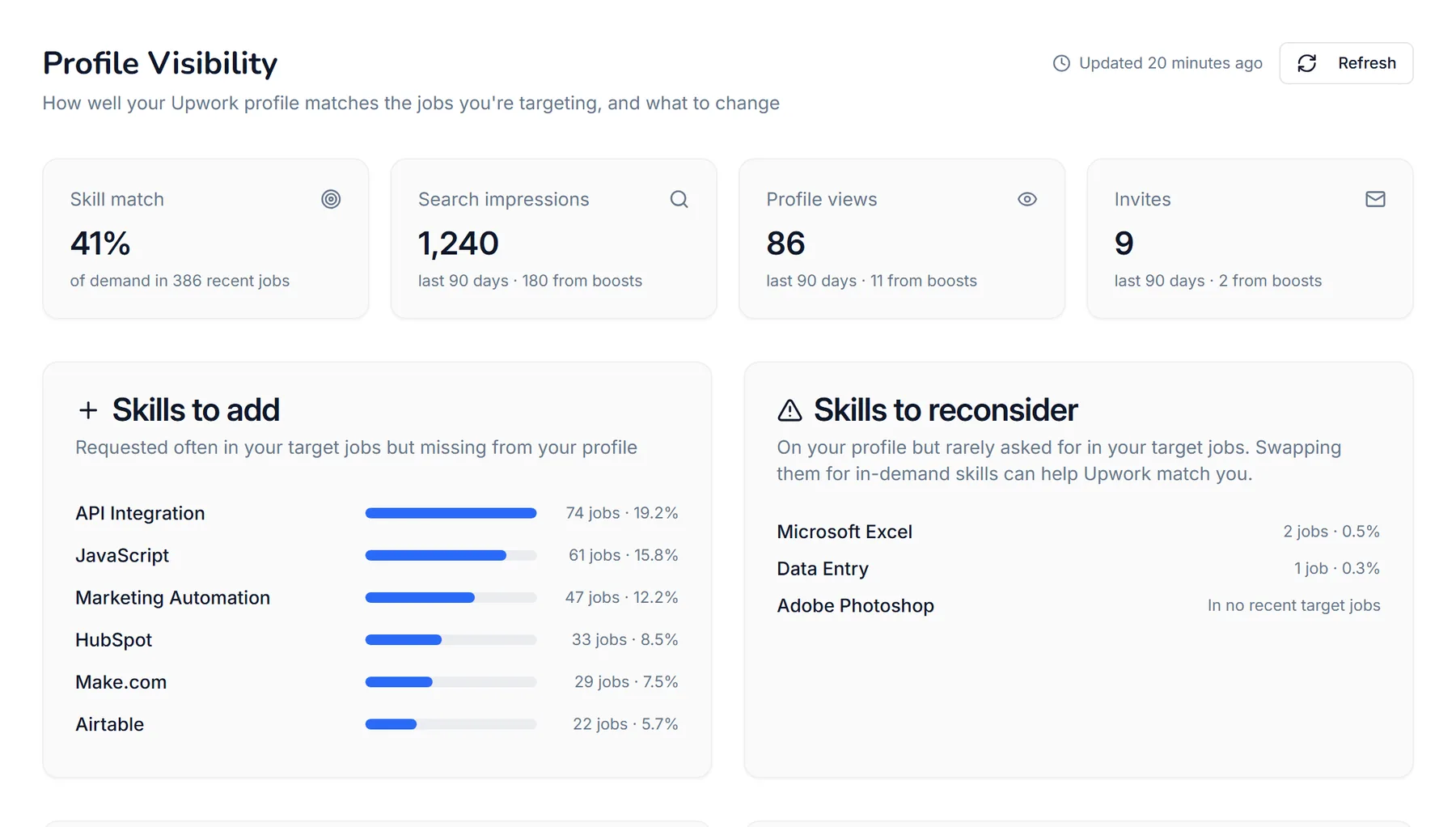
Your Upwork profile should work as hard as you do. WinOnUp measures your visibility, compares your skills with what clients in your niche actually ask for, and shows you exactly what to change.
Profile Visibility
- Search impressions, profile views and invites over the last 90 days, including how many came from boosts
- Skill match: your profile vs. the skills in hundreds of recent jobs for your keywords
- Skills to add, skills to reconsider, and skills already working for you
- Which Upwork categories your target jobs sit in, and whether you're listed there
- A title check against the most-requested terms
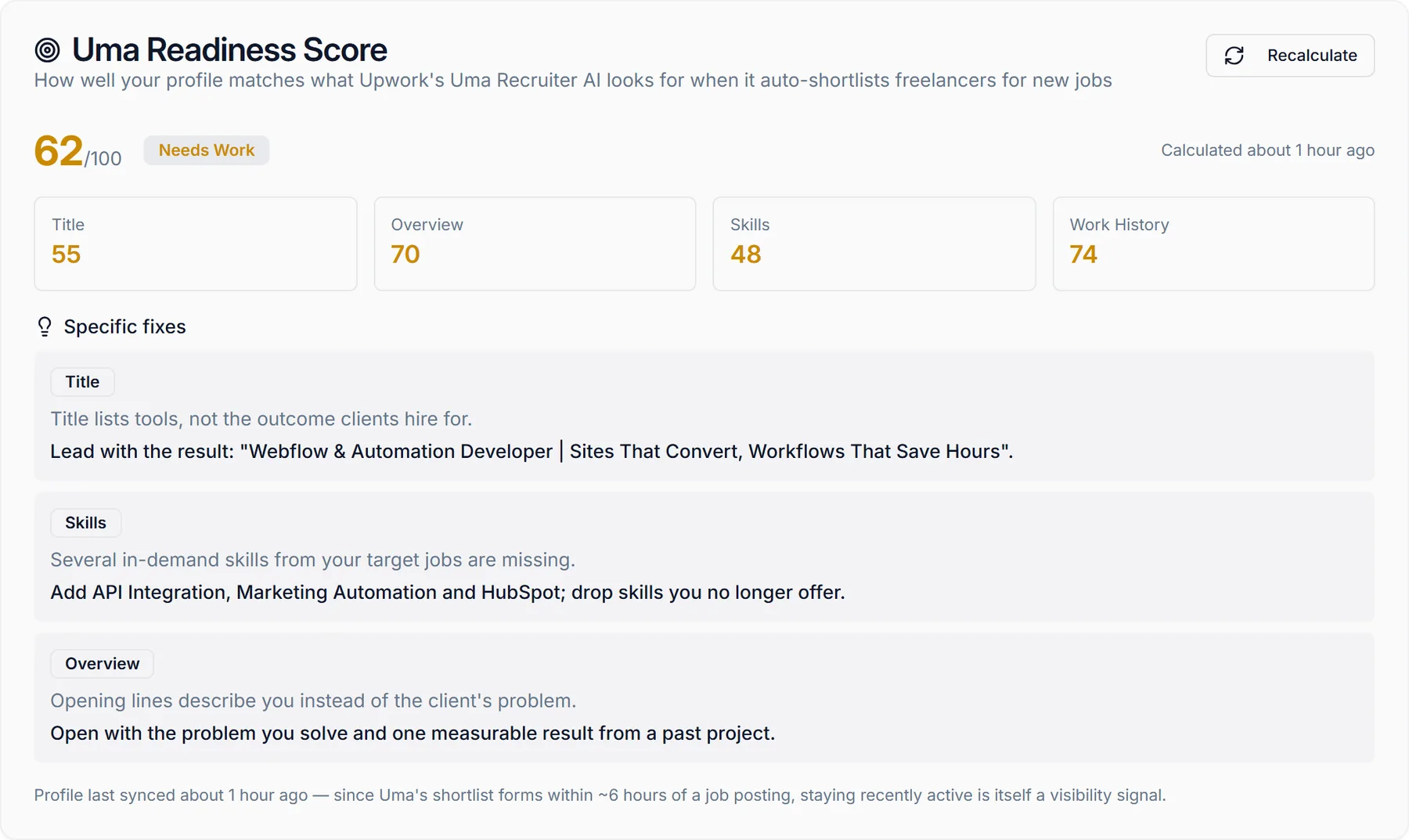
Uma Readiness Score
Upwork's AI recruiter, Uma, shortlists freelancers for new jobs. WinOnUp scores how well your title, overview, skills and work history line up with the signals it's known to use, and gives you specific fixes.
WinOnUp's own assessment; not provided or endorsed by Upwork, and no tool can guarantee recommendations.
Don't just compete for jobs. Position yourself to be found.
Never lose track of your next client.
Every opportunity, proposal, interview and offer in one pipeline that fills itself from your Upwork activity, so you always know what's next.
- Proposals, invites and client messages added automatically
- Kanban or list view, from Opportunities to Contract Won
- Job and client details refreshed from Upwork daily
- Interview alerts, webhooks and API for your own tools
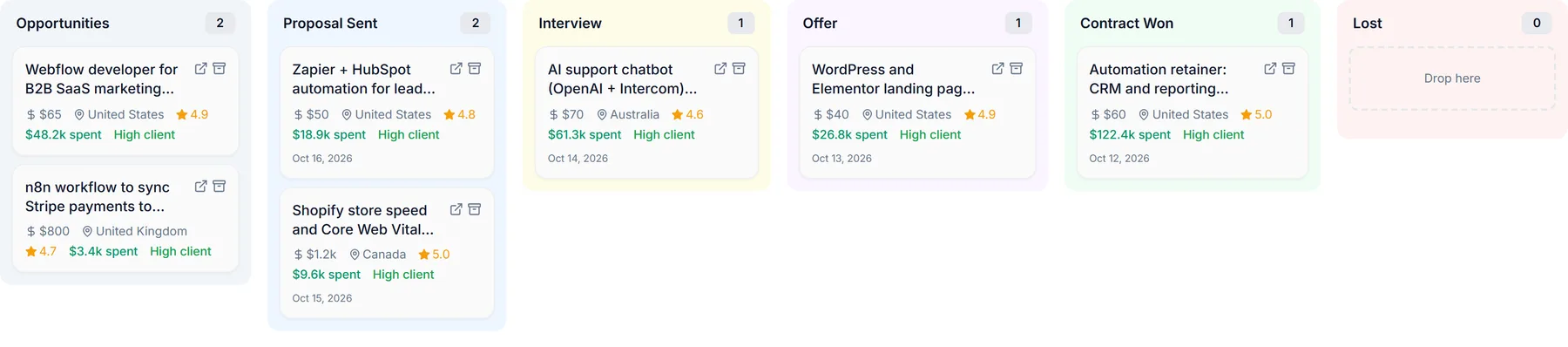
Your Upwork acquisition system, all in one place.
Setup is free. Your 14-day trial starts when you connect Upwork, so the wait for your API key doesn't come out of it.
Create your free account
Add the keywords you target and your job preferences. No card needed to sign up.
About 5 minutesRequest your Upwork API key
Apply for your own key in Upwork's developer portal. Your Upwork password never touches WinOnUp.
Upwork usually approves in 1–3 daysStart your trial and connect
Once your key is approved, add a card to start your 14-day free trial and connect Upwork. Then set your filters and pick where alerts go.
Your 14 days start hereStart executing
Get alerts, apply to the right jobs with tailored proposals, track every deal, and watch what your Connects return.
Runs 24/7 after thatBuilt to work with Upwork. Not against it.
WinOnUp is an independent tool, not affiliated with Upwork. It helps you use Upwork better; it never acts for you.
Official Upwork API
WinOnUp connects through Upwork's own API with your permission. No scraping.
Your password stays on Upwork
You connect with an API key you create. WinOnUp never asks for your Upwork login.
You always submit
WinOnUp drafts proposals. You review them and click Apply on Upwork yourself.
No auto-bidding or messaging
It never applies, bids or messages clients for you, so your account stays in your hands.
Follows Upwork's data rules
Job data from Upwork is cleared or refreshed within 24 hours, as Upwork's API terms require.
Your data is yours
Download everything WinOnUp holds about you from Settings, any time.
One price. Everything included.
Job alerts, client filters, Connects ROI, profile visibility, AI proposals and your pipeline, for less than the cost of five job applications a month.
Full access for 14 days. Setup is free. Your 14 days start when you add a card and connect Upwork, and nothing is charged until the trial ends. Cancel before then and pay nothing.
No card needed to sign up. $14.99/month after your 14-day trial.
Questions, answered
Learning Center
Browse research-backed guides on Upwork proposals, job search strategy, pricing, and the Uma algorithm.
Read the guides →Start winning today
No card needed to sign up. 14-day free trial with full access; cancel before it ends and pay nothing.
Start free trial →Stop wasting Connects. Start winning contracts.
Find better opportunities. Get discovered by clients. Know what's working.
No card needed to sign up · 14-day free trial · Cancel anytime