
Everything you need to win on Upwork, outbound and inbound.
Find and qualify the right jobs, hear about them first, apply with a strong proposal, get found by more clients, and see exactly what your Connects return.
Every new job for your niche, without refreshing Upwork.
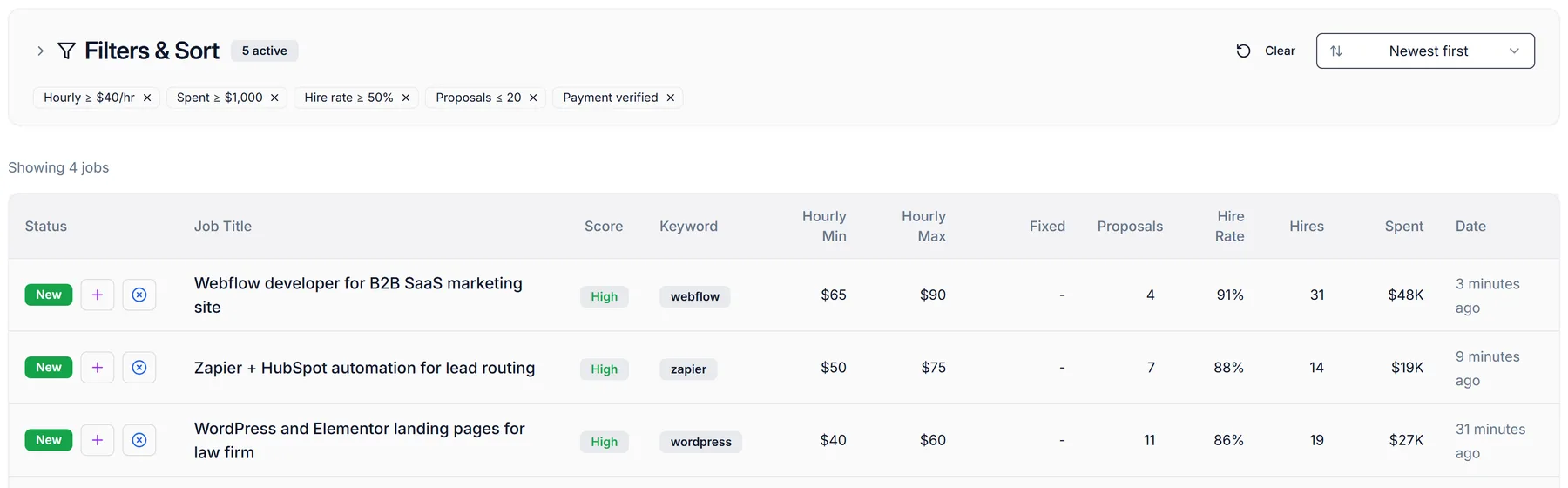
Save the keywords you target and WinOnUp searches Upwork for each one every 60 seconds, around the clock, whether or not you're online. Each job appears once, in a table built for deciding fast.
- Keyword search every 60 seconds, 24/7; no duplicates
- Proposal count, client hire rate, hires, total spend, budget or hourly range, keyword and posted time on every row
- Sort by newest, fewest proposals, highest hire rate, most hires, highest spend, budget or rate
- Add a job to your pipeline (+) or mark it not interested in one click
- Filters collapse into a row of chips so the table stays front and center
Know which clients are worth your Connects before you apply.
Every job gets a client score, and you can filter on the signals that actually predict a hire. Click any score to see exactly how it was built.
- Client score (High / Medium / Low) from rating, reviews, total spent, hires, jobs posted, payment verification and account age
- Filters: minimum client spend, minimum hires, minimum hire rate, payment verified only, US clients only
- Competition filter: skip jobs that already have too many proposals
- Hourly rate and fixed budget ranges
- Your filters are saved to your account and drive your alerts too
Sample client
Hear about the right jobs while they're still fresh.
When a new job matches your filters, WinOnUp sends it to you, even with your browser closed. No more checking Upwork every few minutes.
- Email, Discord or Google Chat (Google Chat needs a Google Workspace account)
- Usually within a minute or two of a job being posted
- Only jobs that match your saved filters, posted in the last hour
- Several matches at once arrive as one message, not a flood
- Each alert shows pay, proposals, hire rate, hires, spend and a link to the job
- One-click test alert, and a heads-up if your Upwork connection ever drops
Sample alerts
A tailored first draft in seconds, in your own voice.
WinOnUp reads the full job post and combines it with your synced Upwork profile and work history, so the draft speaks to the client's problem and points to relevant past work. You edit, you submit.
- Uses the whole job post, not just the title
- Pulls relevant projects from your synced Upwork profile and work history
- AI Settings: tone, length, opening style, pricing mention, single call-to-action
- Your own intro, closing and extra instructions on every draft
- WinOnUp never submits: you review and click Apply on Upwork
For your setup I'd start by mapping your current lifecycle stages so nothing gets routed twice…
Sample draft
WinOnUp, right on the Upwork job page.
The WinOnUp extension adds a sidebar to Upwork job pages, so you can check the client, draft a proposal and save the job without switching tabs.
- Generate a proposal from the job you're looking at
- Copy it straight into Upwork's proposal box
- Save the job to your WinOnUp pipeline
- Connects to your WinOnUp account in one click
Illustration of the extension sidebar
See what your Connects actually get you.
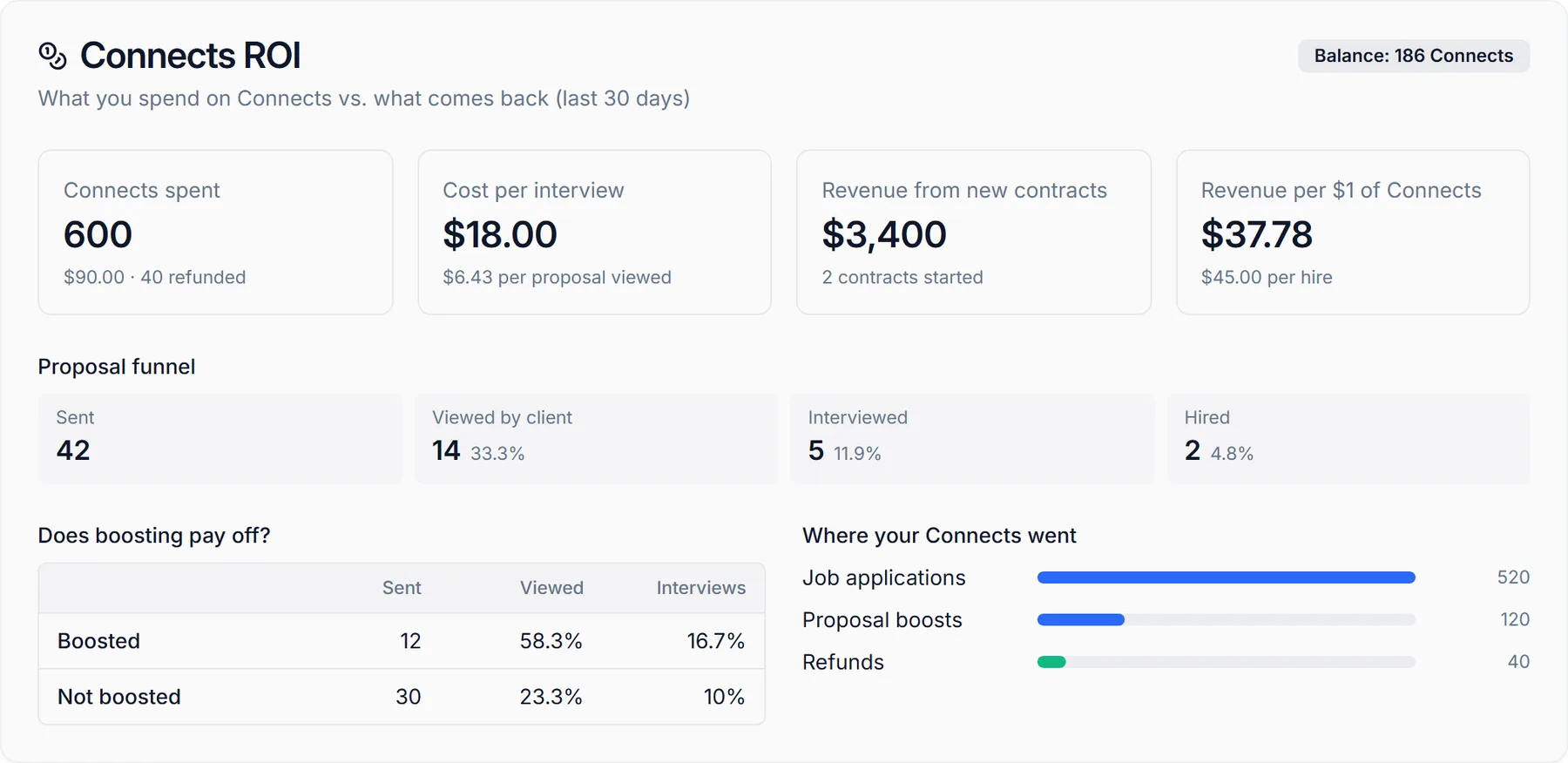
Upwork tells you your Connects balance. WinOnUp tells you what that spending returned: views, interviews, hires and revenue, using Upwork's own numbers for your account.
- Connects spent, in Connects and dollars, with refunds and your current balance
- Where they went: job applications, proposal boosts, profile boosts, refunds
- Cost per proposal viewed, per interview and per hire
- Revenue from new contracts, and revenue per $1 of Connects
- Proposal funnel: sent → viewed → interviewed → hired
- Boosted vs. not boosted: view and interview rates side by side
Find out how visible you are, and how to fix it.
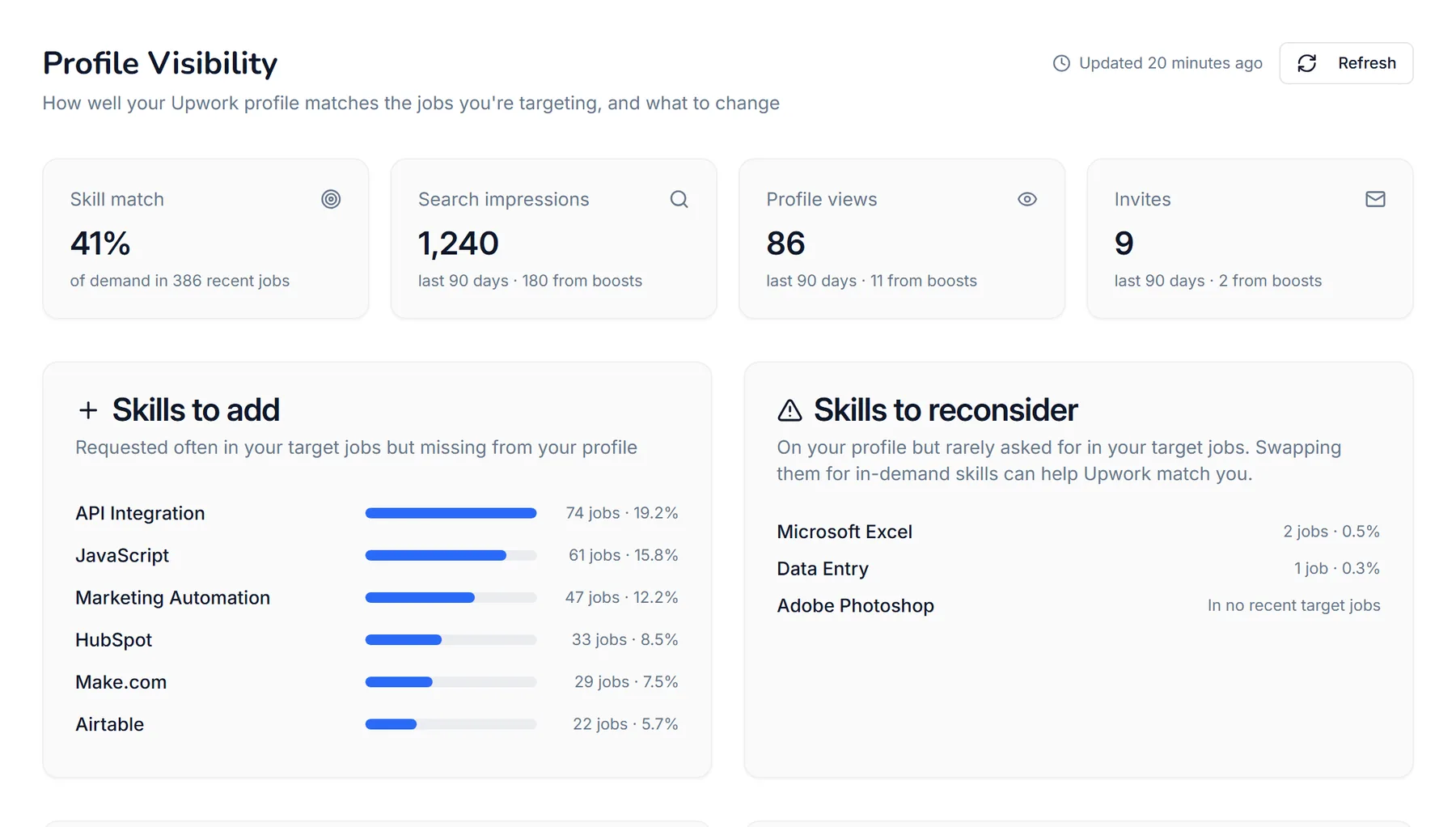
WinOnUp samples hundreds of recent jobs for your own keywords and compares the skills and categories clients ask for with what's on your profile, then tracks how often clients actually find you.
- Search impressions, profile views and invites over the last 90 days, including how many came from boosts
- Skill match: how much of the demand in your niche your profile covers
- Skills to add (with how many jobs ask for each), skills to reconsider, and skills already working
- Which Upwork categories your target jobs sit in, and whether your profile is listed there
- Title check against the most-requested terms
- Search Upwork's full, current skill list (14,000+), refreshed daily, with newly added skills marked
Line your profile up with how Upwork's AI recruiter shortlists.
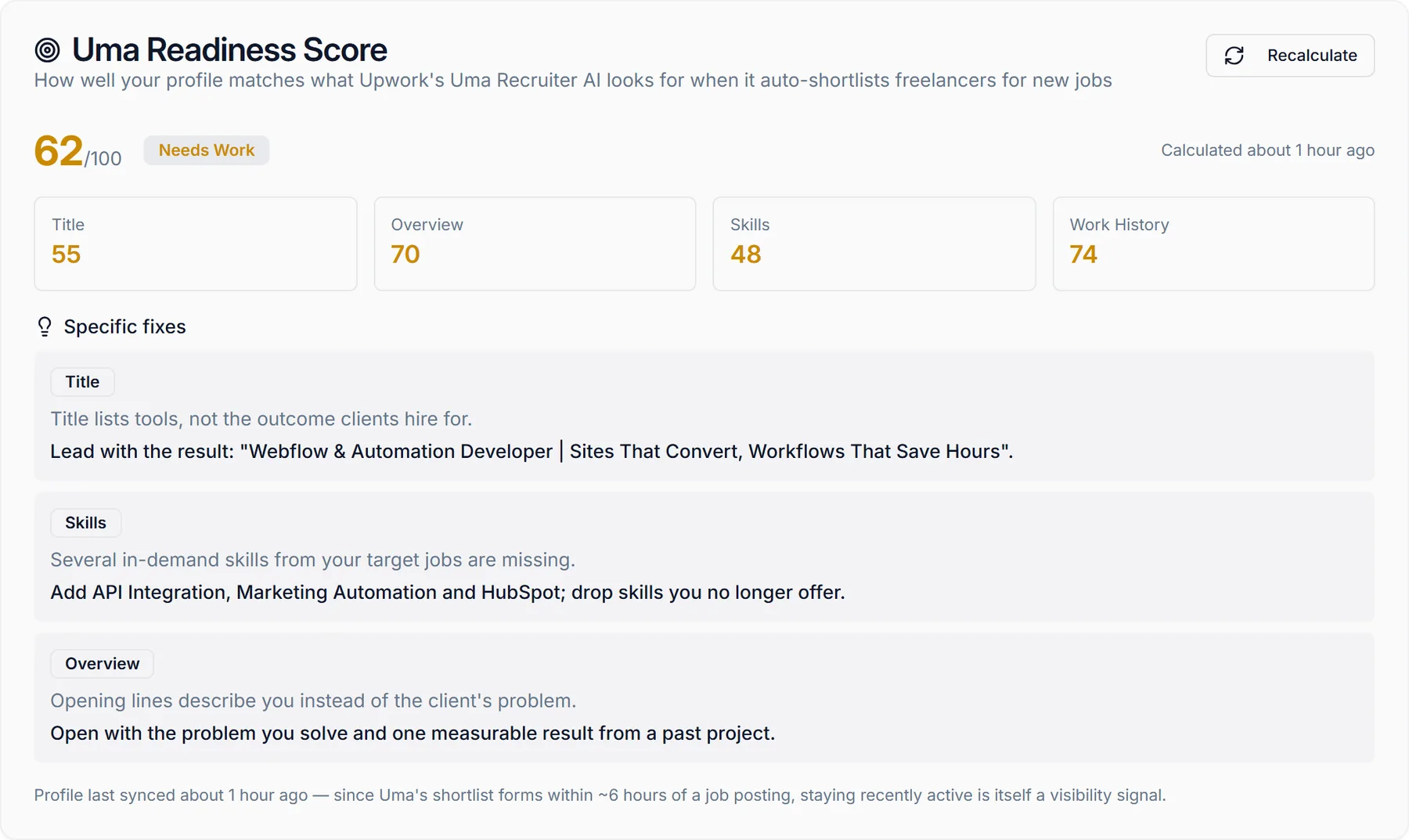
Uma, Upwork's AI recruiter, shortlists freelancers for new jobs. WinOnUp scores your title, overview, skills and work history against the signals it's known to use, and tells you exactly what to change.
- Overall score plus title, overview, skills and work history sub-scores
- Specific fixes, written for your profile, not generic tips
- Recalculate after you update your profile to see the effect
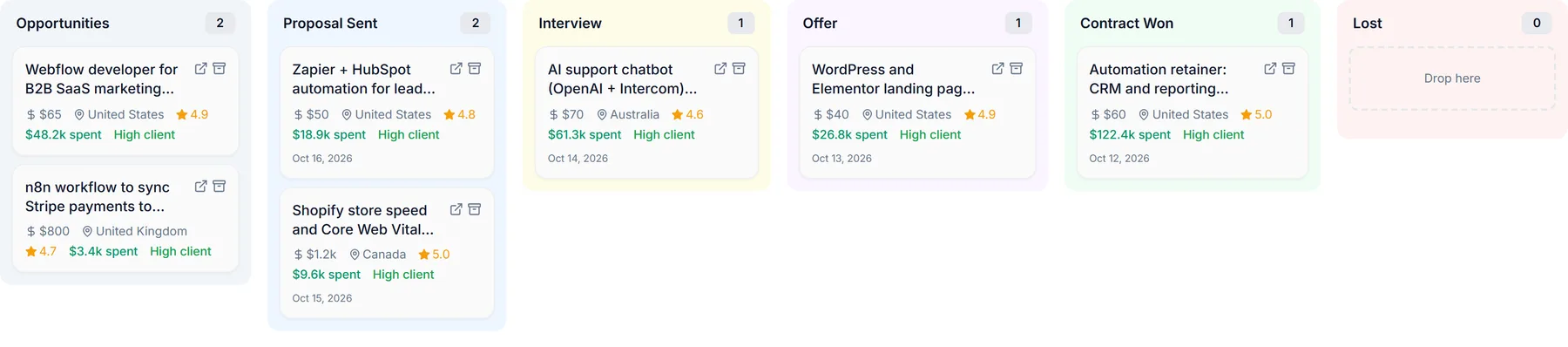
Every lead, from first look to contract won.
A pipeline that fills itself from your Upwork activity, so nothing slips: what you applied to, who invited you, who's interviewing you and what's been offered.
- Stages: Opportunities → Proposal Sent → Interview → Offer → Contract Won / Lost
- Kanban or list view; drag cards between stages; archive old deals
- Proposals and client invites added automatically
- Job and client details kept up to date from Upwork
- Client score on every card
The rest of your Upwork toolkit.
Dashboard
Active opportunities, proposals, interviews, offers and contracts won, with activity charts and keyword performance for any period from today to 180 days.
Daily goal and streak
Set a daily proposal target and keep a streak going. Consistency beats bursts on Upwork.
Interview monitoring
New interview conversations and client invites are picked up and added to your pipeline automatically.
Webhooks
Send interview, proposal-generated and deal-stage events to Zapier, Make or any tool that accepts a webhook.
Personal API
API keys for pulling your own stats into a spreadsheet or reporting tool.
Data export
Download everything WinOnUp holds about you from Settings, any time.
Stop wasting Connects. Start winning contracts.
Find better opportunities. Get discovered by clients. Know what's working.
No card needed to sign up · 14-day free trial · Cancel anytime