How to get more invites on Upwork: the skills, title and categories that get you found
Get more invites on Upwork by fixing your profile skills, title and categories, the fields Upwork search uses to put you in front of clients.
- →Fill all 15 Upwork skill tags with keywords matching active job posts.
- →Use a layered profile title: service, specialty, and platform/tool.
- →Focus on in-demand skills like AI, development, and design for 2026.
- →Earn talent badges and use your Connects for visibility boosts.
- →Being responsive and niche-focused increases Upwork invite rates.
Introduction
Wondering how to get more invites on Upwork? The key is making your profile discoverable both by Upwork’s search and by real clients—from your skill tags to your title, each part matters. Matching your skills to in-demand categories, mastering your overview’s first 200 characters, and earning talent badges all help trigger Upwork’s invitation system and AI recruiter. Even how you use Connects and respond to messages plays a role in your visibility and credibility.
This guide breaks down exactly what skills, titles, categories, and profile strategies win you more invitations—not just more views. Whether you’re just getting started or looking to boost your existing profile, the steps here will put you in front of better, higher-paying clients.
Match your skills, title, and categories to client searches
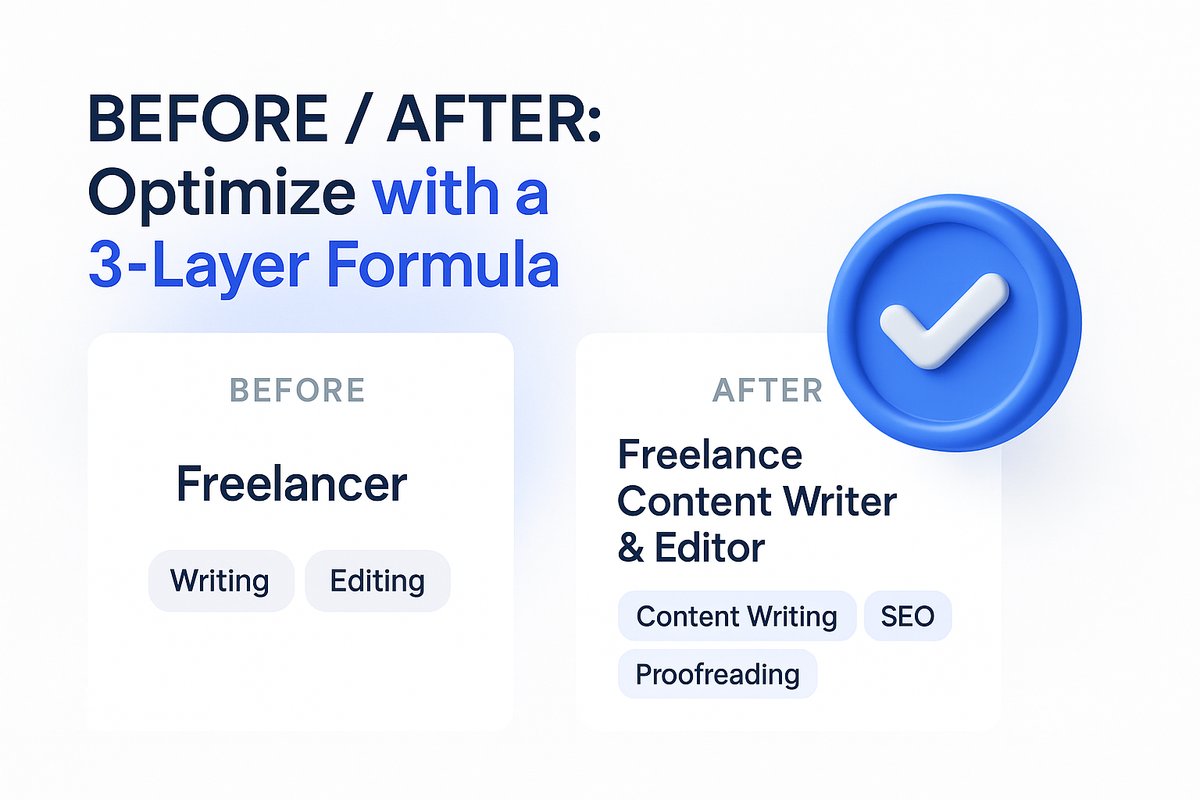
Upwork’s client search rewards the profiles that match real job-post keywords. Fill all 15 of your skill tags, not just the basics, and use the exact words you see in jobs you want. For example, if job listings mention 'AI video editing' or 'data annotation,' use those phrases exactly in your skill tags. Your profile title should use a 3-layer formula: general service, your specialty, and the main tool or platform. For example: 'Content Writer • E-commerce Copy • Shopify.'
The first 200 characters of your overview—what clients see in search previews—should feature your main service and unique edge so clients know at a glance what you do.
Focus on high-demand skills and categories for future invites
Certain skills are trending in demand on Upwork, and clients are actively searching for them. AI-focused services like AI video editing, chatbot development, and data labeling are growing rapidly. At the same time, classic roles like full-stack development, graphic design, and virtual assistance remain strong.
Align your skills and categories to what clients are hiring for in 2026. This increases both your invite chances and your profile’s staying power, especially as algorithms push profiles with the right tags higher in client searches.
Make your profile complete and earn talent badges
Upwork prioritizes freelancers whose profiles are 100% complete. This means a professional photo, filled skills and employment sections, a well-crafted overview, and—ideally—a portfolio and verified certifications. Profiles that are complete are hired 4.5 times more often, according to Upwork’s own data.
Aim for talent badges: Rising Talent, Top Rated, Top Rated Plus, and (for the elite few) Expert‑Vetted. Badges boost your search ranking, earn you extra Connects, and unlock access to premium invitations. An identity verification badge is another trust-builder—available for 35 Connects and lasts three years.
Use Connects and Upwork features for visibility and more invites
Connects aren’t just the price of applying—they’re tools for profile and proposal visibility. Use Connects earned from badges, completing Upwork’s education content, or submitting proposals wisely. Set your Availability Badge (using Connects) when you’re ready for work—freelancers with it get up to 70% more invitations.
Boosted Proposals and Profile Boosting let you pay for temporary slots at the top of search results or client feeds, multiplying your odds of being seen. Experiment with these paid features when competition is high, but always track your return; WinOnUp’s Connects ROI tools can help calculate what you’re really earning per Connect.
Trigger invitations with the right behaviors and algorithms
Upwork uses three main triggers to send client invites: keyword search, saved profiles (bookmarked by clients), and boosted profile placement. Your job is to signal relevance on all fronts. Exact-match keywords in your title and overview matter for search, while niche specialization makes clients more likely to bookmark you for later invites. Paid boosts help put you right in front of urgent clients.
Stay responsive. Respond quickly to any client contact—having a ‘fast responsiveness’ tag gets you more algorithm boosts. Always protect your Job Success Score, since it’s key for badges and getting picked by Upwork’s AI recruiter (Uma).
If you want an extra edge, review your profile against the real invitation triggers—WinOnUp’s Profile Visibility and Uma Readiness Score can help highlight what’s missing and suggest which skills to add based on recent search data.
Niche down and apply early for higher invite rates
Clients are more likely to invite freelancers with a focused niche. Position yourself as an expert in a specific type of work, making you more searchable and memorable. A clear, tight niche paired with a strong portfolio increases both direct invites and the odds that Upwork’s algorithms flag you as a match.
Speed also wins. Applying to new jobs quickly—ideally within minutes of posting—puts you early in both client review and Upwork’s AI recruitment flow. Quick alerts help here: WinOnUp searches Upwork every 60 seconds for your saved keywords and sends you instant notifications by email, Discord, or Google Chat, so you can jump at fresh leads. For details, see how to get Upwork job alerts the minute a job is posted.
Track your results and refine your approach
The more you track which jobs and skills earn you invites, the better you can refine your profile and tactics. Watch how changes to your title or skill tags affect your search impressions and invite count. Connects ROI is also worth tracking—calculate how much each proposal or invite costs you versus what it earns, with tools like the Connects ROI Calculator.
Look for patterns: Which categories, times of day, or profile tweaks bring real results? Over time, this lets you invest more Connects and effort where the invite rates actually pay off.
Conclusion
Getting more invites on Upwork isn’t about luck—it’s about fitting what you offer to how clients search and Upwork’s system selects talent. Fill every skill and category, use a memorable title and niche, and focus on both high-demand skills and responsive, proactive behavior. Small profile changes can make a big difference to who sees and invites you next.
For even faster progress, try WinOnUp’s alert and insights tools: no card needed to sign up, and you’ll see which skills to add, when to apply, and how your Connects actually pay off.
Frequently asked questions
How many skills should I list on my Upwork profile for more invites?
You should fill all 15 available skill tags, choosing keywords that match active job posts you want to bid on. This increases your visibility when clients search or use Upwork’s algorithm-based recruiter.
Do talent badges really help increase invites on Upwork?
Yes. Badges like Rising Talent, Top Rated, and Expert-Vetted boost your profile’s search ranking, credibility, and may unlock exclusive invites, along with providing free Connects.
Is using Boosted Proposals or Profile Boosting worth the Connects?
When competition is fierce, paying with Connects for profile boosts or proposal boosts can put you front and center with clients. Always track your ROI to see if the added exposure results in actual contracts or interviews.
What’s the fastest way to catch new job opportunities on Upwork?
Applying early helps you stand out. Alert tools like WinOnUp can notify you by email, Discord, or Google Chat within a minute or two of jobs matching your skills being posted.
Does niche specialization increase Upwork invites?
Yes. Specializing makes you easier for clients to find when they need a specific type of expertise, and increases your chances of being saved for future invites or being matched by Upwork’s AI recruiter.
Stop missing the Upwork jobs worth your Connects.
- New-job alerts every 60 seconds by email, Discord or Google Chat
- Client hire rate, spend and proposal count before you apply
- See what your Connects actually return
No card needed to sign up · 14-day free trial · Cancel anytime
Related guides
Learn how to get Upwork job alerts the moment jobs post, why RSS stopped working, and what to set up instead to stop missing good leads.
Learn Upwork proposal tips that help you choose better jobs, write client-focused openings, use real examples, and track views, replies, and interviews.