
How to set your Upwork rate in 2026: hourly vs. fixed-price by experience level
Discover how to set your Upwork rate in 2026, with real hourly and fixed-price examples by skill level and proven ways to benchmark your freelance pricing.
- →Set your Upwork rate based on skill level, category, and target earnings.
- →Upwork's 2026 guide puts intermediate work at $25–$60/hr and expert work at $60–$120+/hr; beginners usually start below that.
- →Use hourly for evolving projects; fixed-price for clear deliverables, factoring a buffer.
- →Benchmark against Upwork's published ranges and freelancers in your niche, then adjust as you gain experience.
- →Increase your rates as your skills, reviews, or niche value grows.
Introduction
How much should you charge on Upwork? The right Upwork rate depends on your skills, experience and project type. Upwork's own 2026 rate guide puts intermediate freelancers at $25–$60/hr and experts at $60–$120+/hr, with beginners usually starting below that. There's no single answer, but you can set a competitive, realistic rate by benchmarking against these ranges, calculating your target income, and choosing hourly or fixed-price based on the work. This guide breaks down how to set your Upwork rate in 2026, with examples and tips to help you win better clients and make every proposal count.
Upwork hourly rates by experience and category
Upwork's hourly rates guide groups 2026 rates by experience: $25–$60/hr for intermediate freelancers and $60–$120+/hr for advanced freelancers, with the top of the range most common in technical and specialist work. Beginners usually start below the intermediate band while they build reviews.
Rates also vary a lot by category. Upwork's hiring pages, for example, put virtual assistants at roughly $10–$20/hr, while specialist technical skills sit far higher. The most useful benchmark is the profiles of freelancers who offer the same service you do: compare their experience, reviews and rates to find a realistic starting point.
How to calculate your baseline Upwork rate
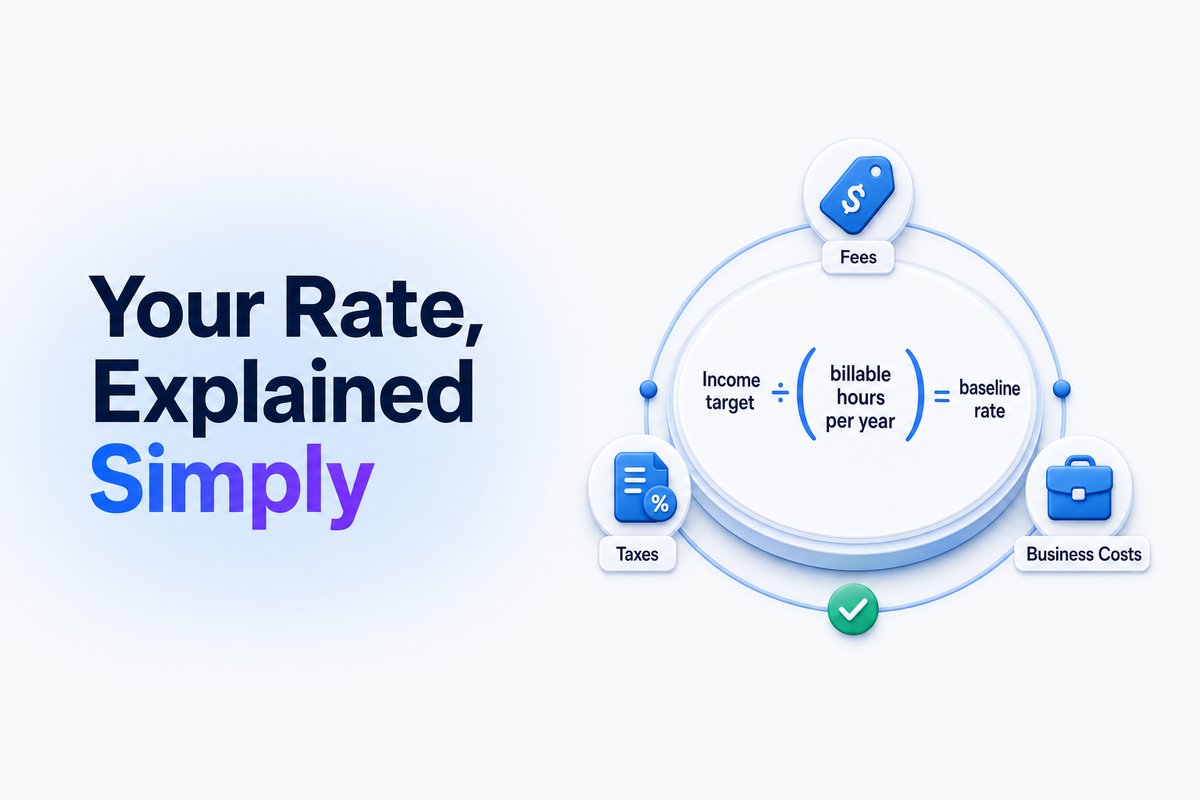
While published ranges give you a starting point, your personal rate needs some planning. First, set an income target for the year. Next, estimate your realistic billable hours. Admin, proposals and other unpaid work eat into your week, so plan to bill noticeably fewer hours than you work.
Factor in Upwork's service fee, taxes and business expenses (software, insurance), then divide your target by your expected billable hours to get a base hourly rate. If you want $50,000 a year and plan to bill 1,400 hours, your baseline is $35.71 an hour before fees and taxes. Raise it until the number still works after those costs.
Hourly vs. fixed-price contracts: which fits your project?
Upwork supports both hourly and fixed-price contracts. Hourly contracts suit long-term or flexible projects where tasks may evolve: clients pay for the hours you track, and tracked time is billed weekly. Fixed-price contracts suit projects with a defined deliverable, such as a logo, a report or a website page. You agree upfront on deliverables and payment milestones.
When quoting a fixed price, estimate the hours you'll need, multiply by your hourly rate, then add a 10–20% buffer for unexpected work or revisions. That cushion protects your real hourly rate as the job develops.
Demand matters too. For a look at where client spending is moving, see our breakdown of Upwork's Q3 2026 earnings.
What real freelancers charge on Upwork in 2026
Most freelancers start near the lower or middle of their bracket, then move higher as they build a track record. Many find that raising their rate brings better clients, not fewer, because higher-budget clients tend to be clearer about what they want.
You can use Upwork’s public freelancer profiles to see what others in your field are charging, and adjust up or down as your skills and results grow. Tracking your response rate, invites, and successful proposals helps you know when your rate is working—and when to experiment.
If you’re not getting replies, check your proposal strategy here or review your Connects investments with the Connects ROI Calculator.
Tips to raise your Upwork rate over time
Start with a rate you can justify based on your current skills, past work and results. After each completed contract or visible skill jump, raise your rate in steps, and quote new clients at the new rate first. Specializing in in-demand categories (like AI, analytics or complex integrations) helps you move toward the top of your bracket.
Refine your profile, target the right categories, and track your profile’s visibility using tools like WinOnUp’s Profile Visibility feature—for details, see how to get more invites on Upwork. Rely on facts and honest self-assessment: a race to the bottom rarely pays.
For insights on how Connects really pay off, see Are Upwork Connects worth it?.
How WinOnUp helps freelancers set and track rates
WinOnUp's job table lets you filter new jobs by budget and hourly range, so you only see work that fits the rate you've set. Its Connects ROI view shows your cost per proposal viewed, interview and hire, plus revenue per $1 of Connects, from your own Upwork numbers, so you can tell whether a new rate is still winning work.
Profile Visibility shows your search impressions, profile views and invites, which helps you spot whether a rate change is affecting how often clients find you. No card is needed to sign up.
For more on WinOnUp’s features, check the full feature breakdown.
Conclusion
Setting your Upwork rate in 2026 works best when you combine published benchmarks, a personal earnings plan and steady feedback from real jobs. Build in a buffer when quoting fixed prices, and don't be afraid to raise your rates as your skills grow or your niche becomes more valuable.
To supercharge your workflow, learn how to get Upwork job alerts the minute a job is posted and never miss a targeted client opportunity.
Frequently asked questions
What is a good hourly rate for beginners on Upwork in 2026?
Beginners usually start below Upwork's intermediate band of $25–$60 an hour, depending on skill, demand and category. Check profiles in your niche for a realistic starting point.
How should I price fixed-price projects on Upwork?
Estimate how many hours the job will take, multiply by your hourly rate, and add a buffer of 10–20% for scope changes or revisions. This ensures your effective hourly rate is protected if the project scope grows.
When should I increase my Upwork rate?
Raise your rate after you have strong reviews, a better portfolio, or in-demand expertise—start at the lower or middle end and increase gradually as you prove your value.
Can I see what other freelancers charge on Upwork?
Yes, Upwork profiles are public, so you can view rates for similar freelancers in your category and adjust your own accordingly.
Does WinOnUp set my rate automatically?
No. WinOnUp helps you filter jobs by budget and hourly range and track your Connects ROI, but you always set your own rate and handle your own proposals and negotiations.
Stop missing the Upwork jobs worth your Connects.
- New-job alerts every 60 seconds by email, Discord or Google Chat
- Client hire rate, spend and proposal count before you apply
- See what your Connects actually return
No card needed to sign up · 14-day free trial · Cancel anytime
Related guides
Learn how to quickly find good Upwork jobs by filtering for quality projects, trustworthy clients, and high return on your Connects in 2026.
If your Upwork proposals aren't viewed, here’s why clients skip them—and what you can do to get more eyes (and replies) on your applications.
Understand how the Upwork Job Success Score is calculated and learn practical steps to raise your score. Clear examples and useful tips for freelancers.